Boarding & check-in solution — for vessels
Know exactly who is on board. Even when the internet isn't.
POBoard turns a tablet at the gangway into a sub-second barcode check-in, keeps a live, muster-ready headcount in the office, and never loses a single movement — online or off.
- SUB-SECOND SCANS
- FULLY OFFLINE-CAPABLE
- EVERY MOVEMENT KEPT
- BRANDED TO YOUR FLEET
How it works
Three moves. One record.
STEP 01
The pass
Everyone gets a barcode pass, generated automatically from the control panel based on their ID — printed card, lanyard, or simply shown on a phone.
STEP 02
The scan
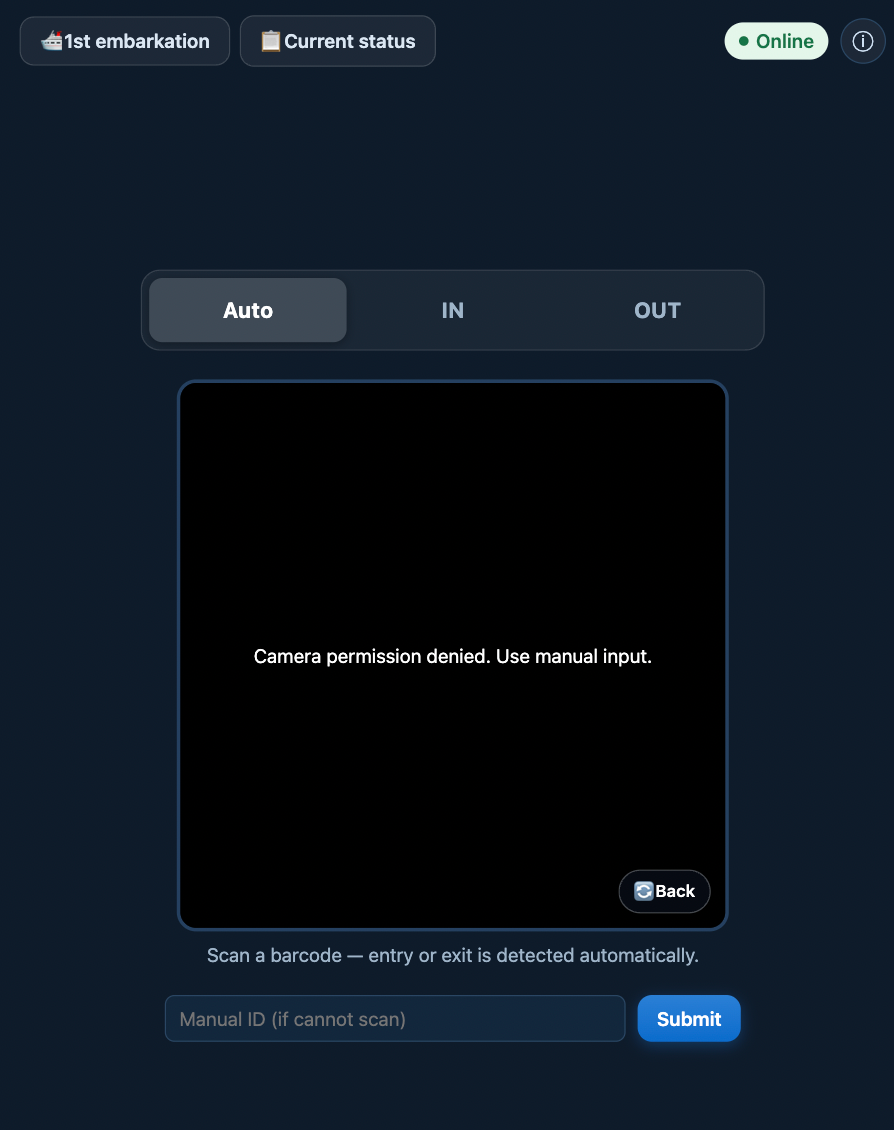
One scan in, one scan out at the gangway tablet. Auto mode reads the person's current status and detects direction by itself — under a second, answered with a full-screen confirmation.
STEP 03
The answer
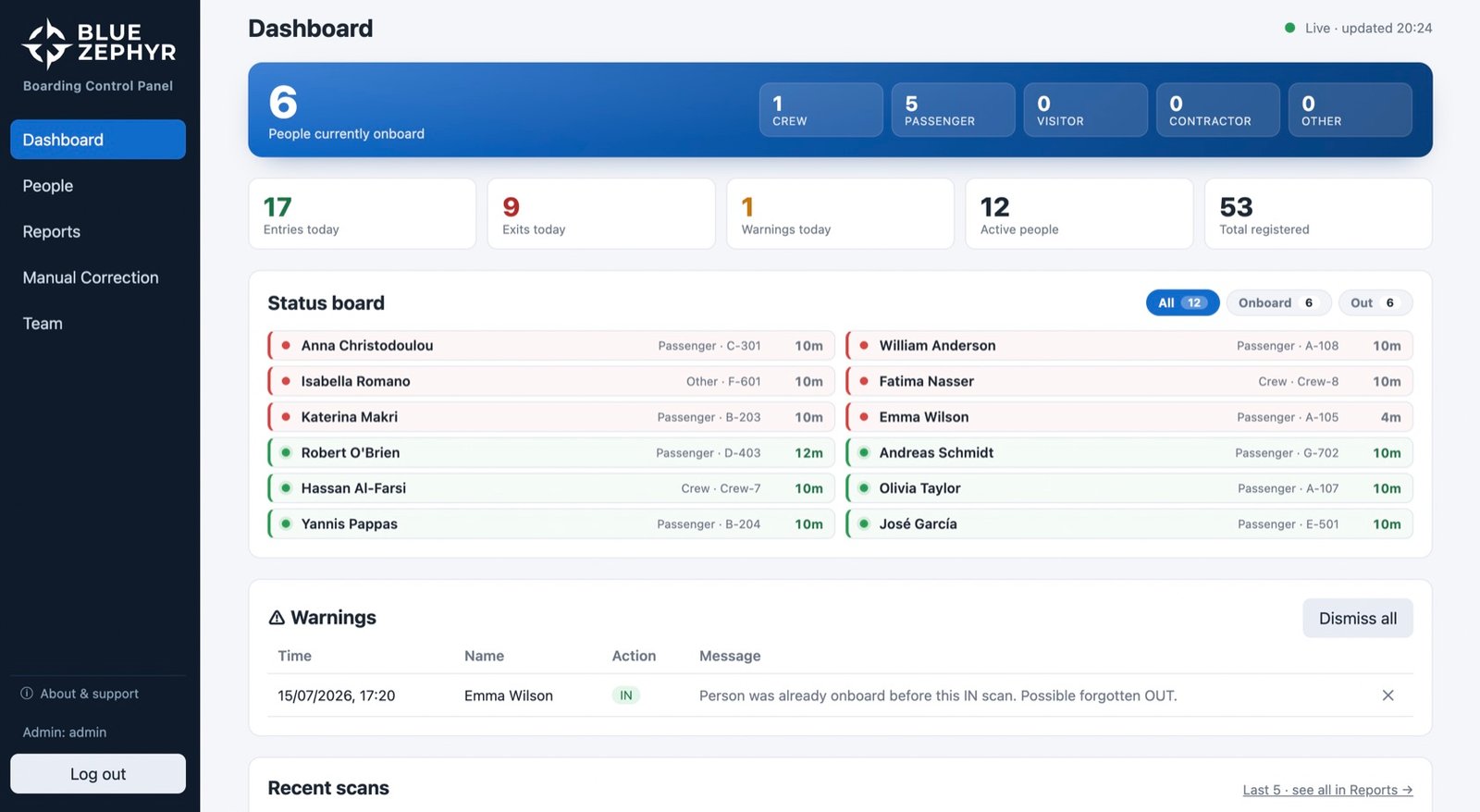
The office always knows: who is aboard right now, for how long, today's flow, active warnings and the full exportable history — live, on one calm dashboard.
The gangway app
The gangway speaks in color.
Full-screen answers a deckhand can read in hard sunlight with a queue behind them — name, role, time, done.
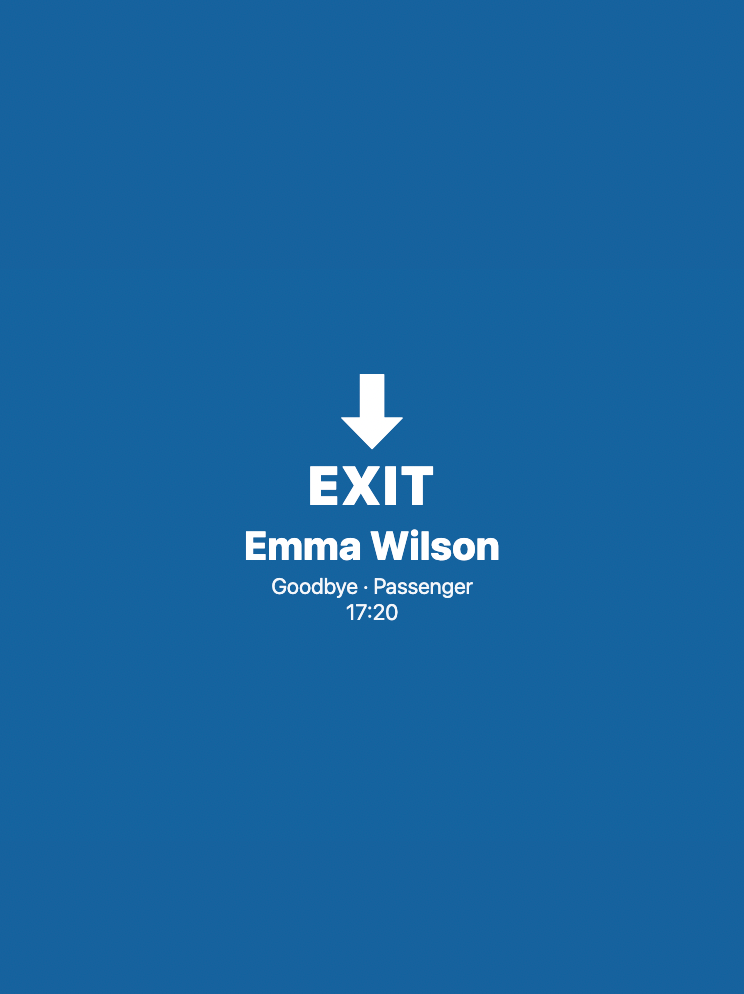
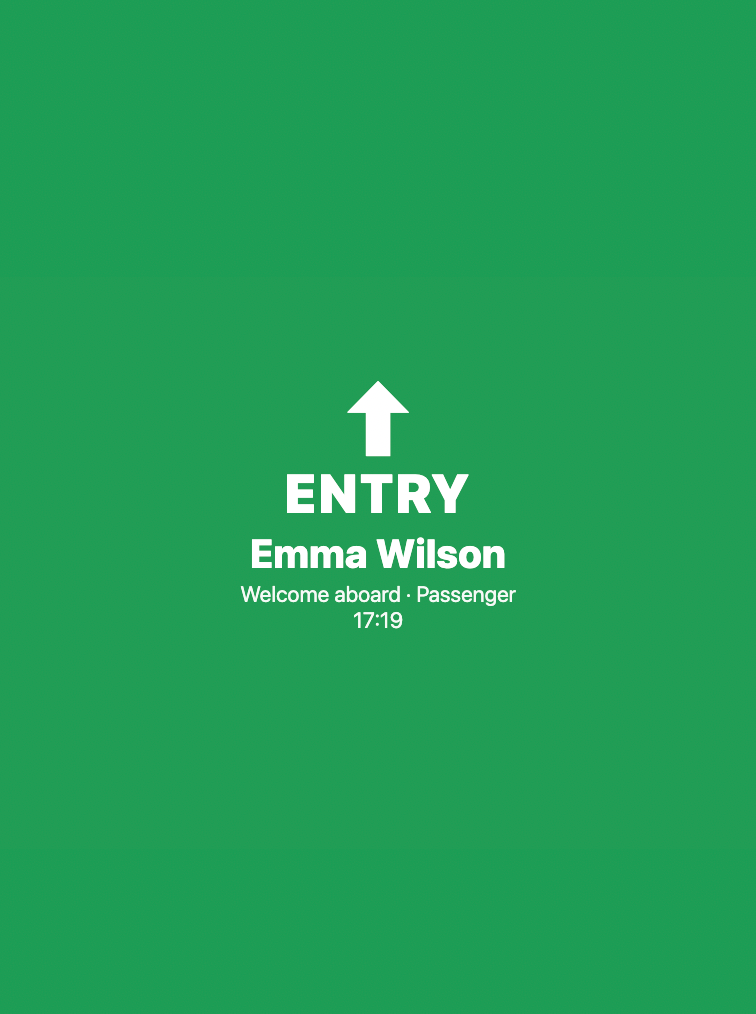
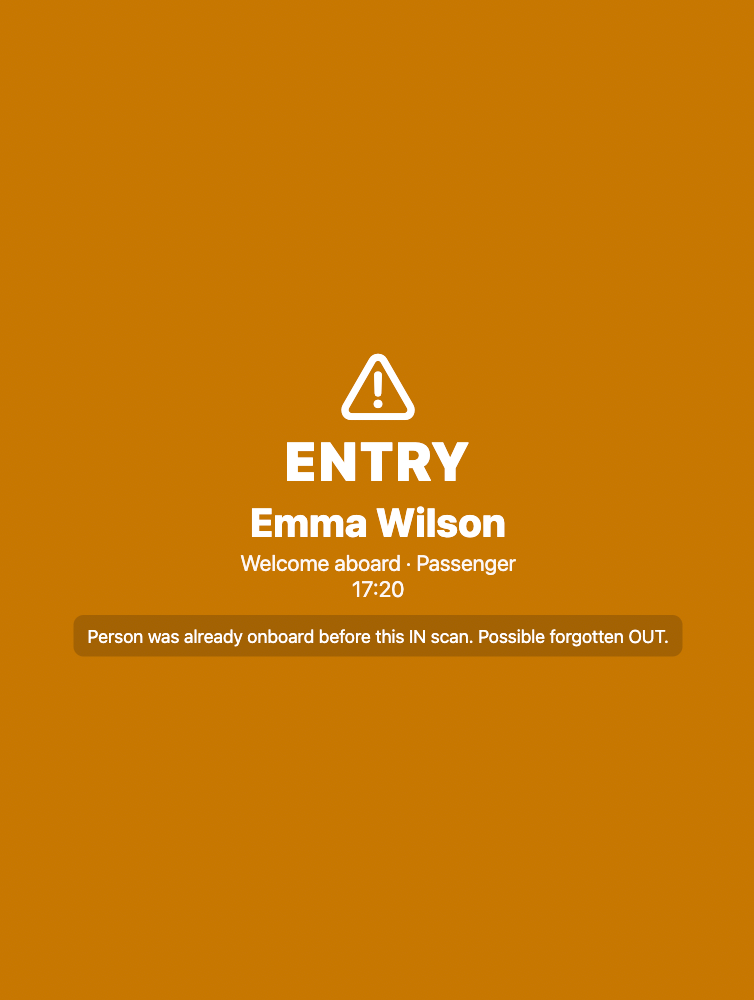
Expired or deactivated passes are refused on the spot with a clear red screen — even with zero connectivity. And whenever a movement doesn't add up — a double-IN, a missing OUT, anything that contradicts the record — the office is warned, but the line is never held: the scan is recorded, the queue keeps moving.
The office console
One control panel. The whole operation.
- Who's aboard, right nowThe live count, with time aboard for every person — crew, passengers, visitors, contractors — updating as scans happen.
- Today at a glanceEntries, exits and net movement, following the vessel's local day — so the numbers always match your reports.
- Warnings wait for a humanDouble-INs and missed OUTs surface here for a decision — dismissed in a click, or repaired with a correction.
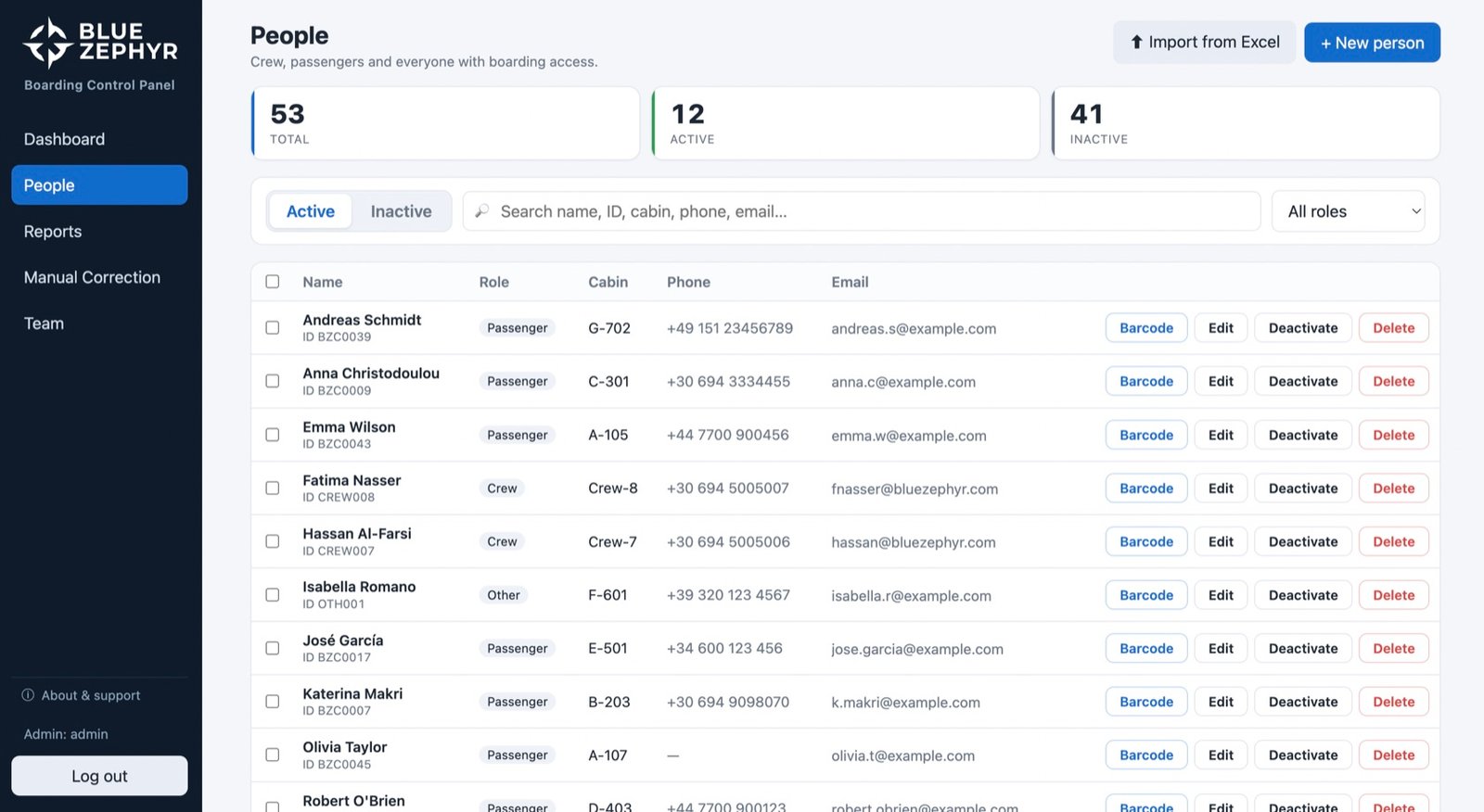
- Everyone with boarding accessCrew, passengers, visitors, contractors — searchable, filterable, bulk-editable, active or archived.
- Excel import, one clickA whole guest or crew list becomes barcode passes in minutes — no retyping.
- Expiry that means itPasses deactivate themselves on their expiry date — and can't be revived without a new date, on purpose.
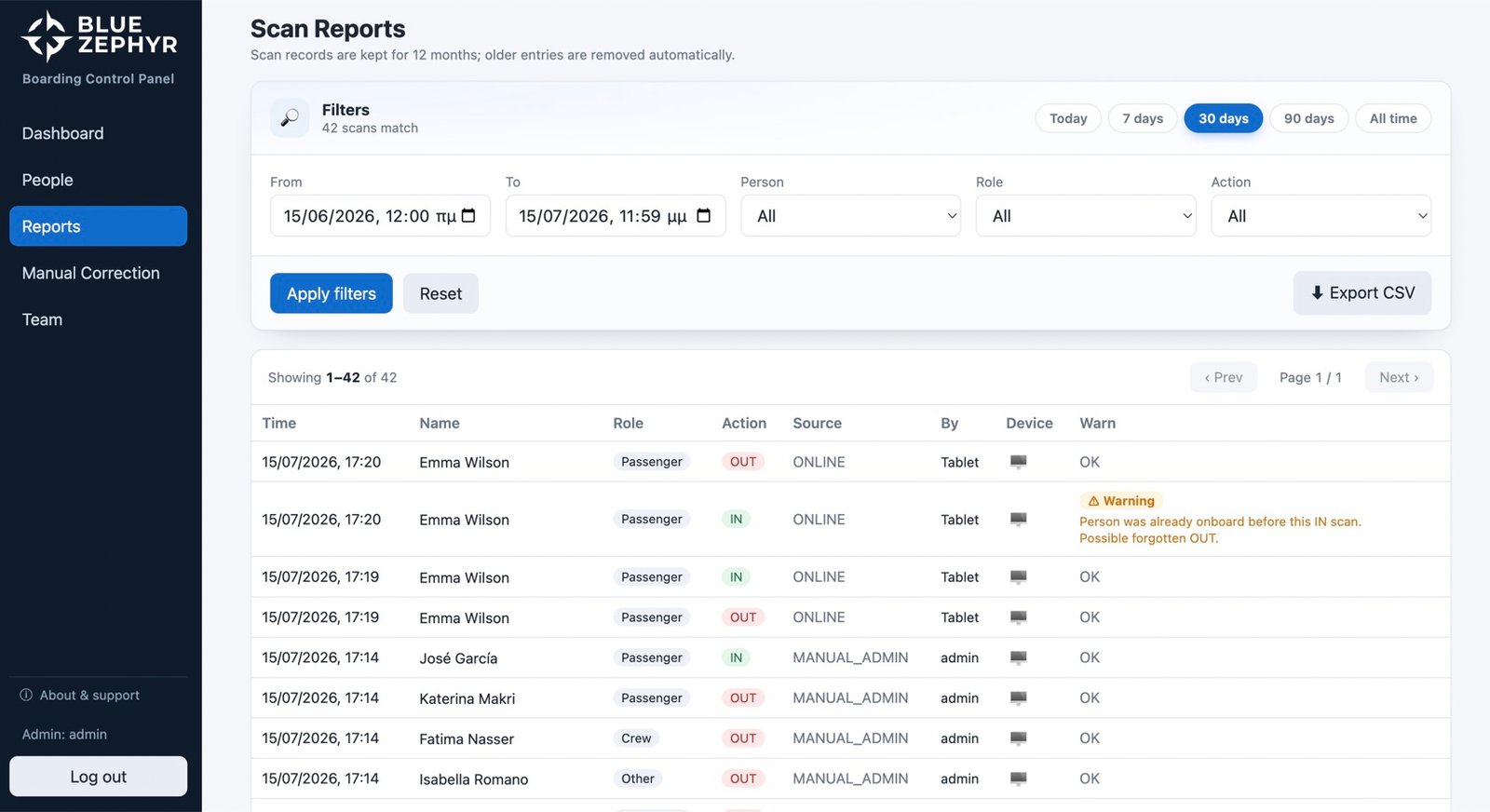
- Filter everythingDate range, person, role, direction, source — live scan, offline sync or manual correction — and device.
- CSV exportManifests, payroll, audits and drills, straight from the record. Administrators only.
- Kept 12 monthsScan history is retained for a full year, then purged automatically — data minimisation by default.
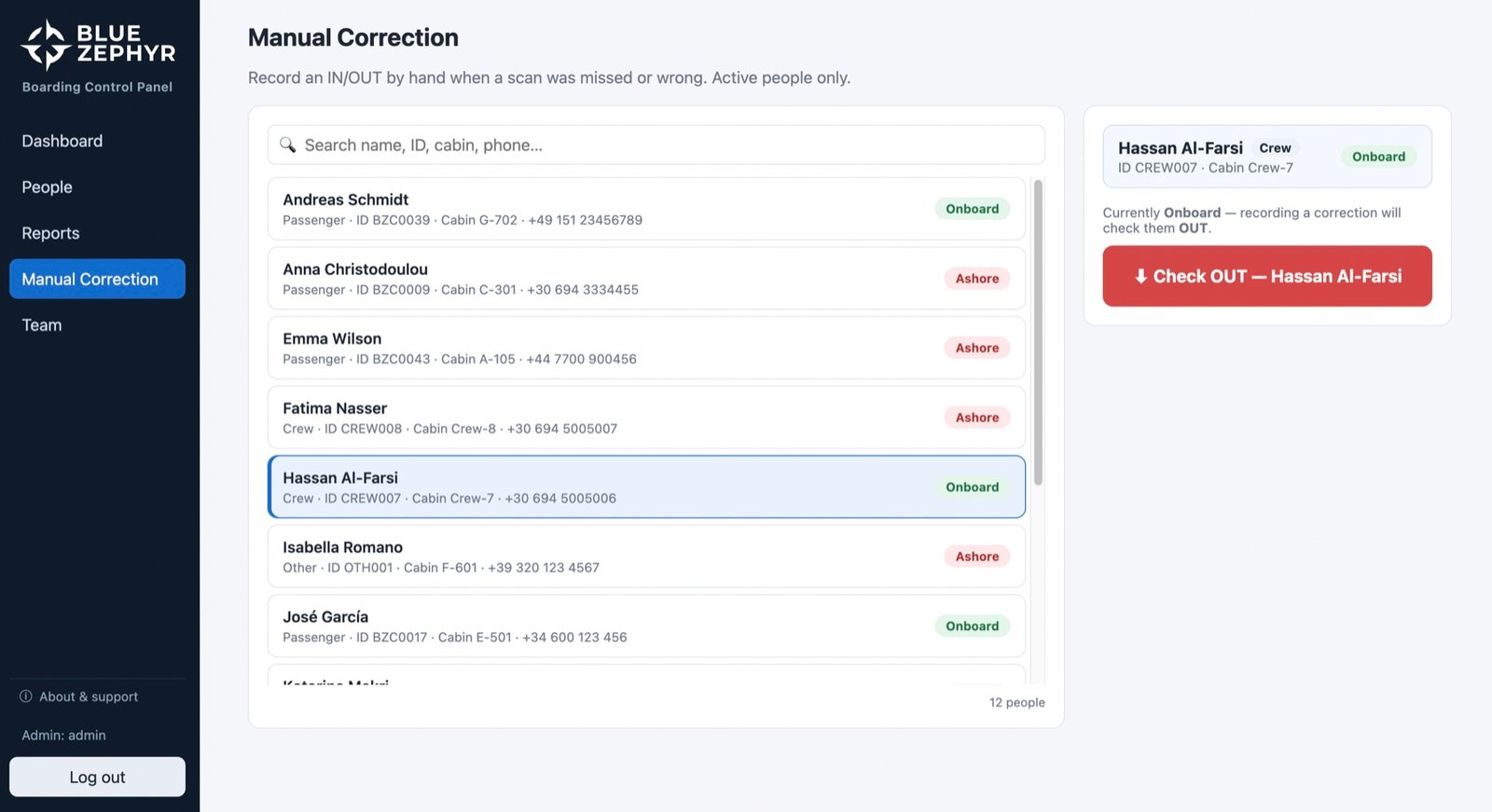
- Fix reality in secondsA missed or mis-directed movement is corrected with one guided action — the live count updates instantly.
- Signed by nameEvery correction is stored permanently with the acting account's name and role at that moment.
- History never editedCorrections are new events, not erasures. The record only ever grows — that's what makes it trustworthy.
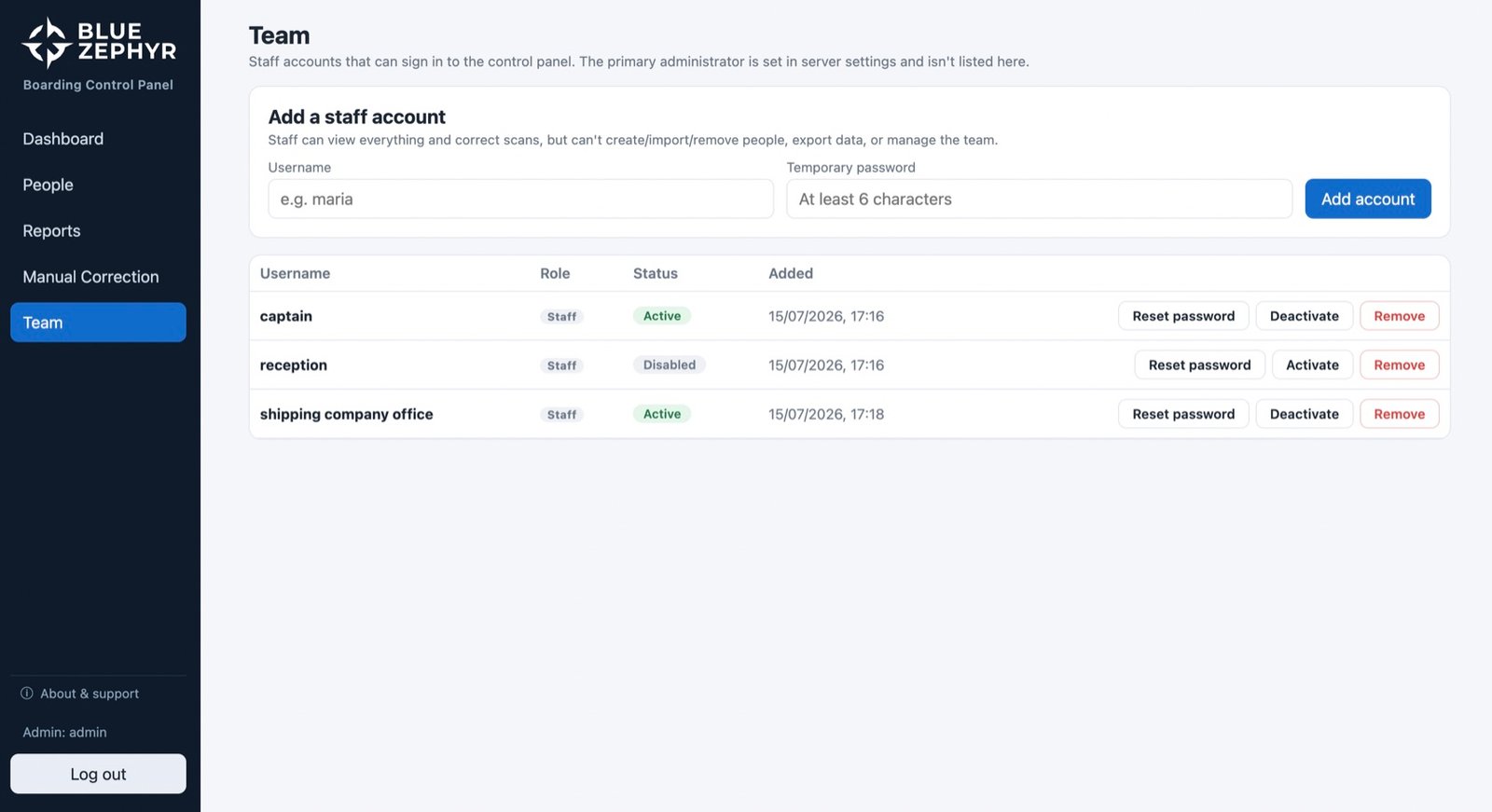
- Roles with teethAdmin and staff permissions are enforced by the server on every request — not just hidden buttons.
- Instant lockoutDeactivate an account and its very next action is refused, even mid-session.
- Never locked out yourselfThe root administrator lives in server configuration — it can't be deleted, disabled or lost.
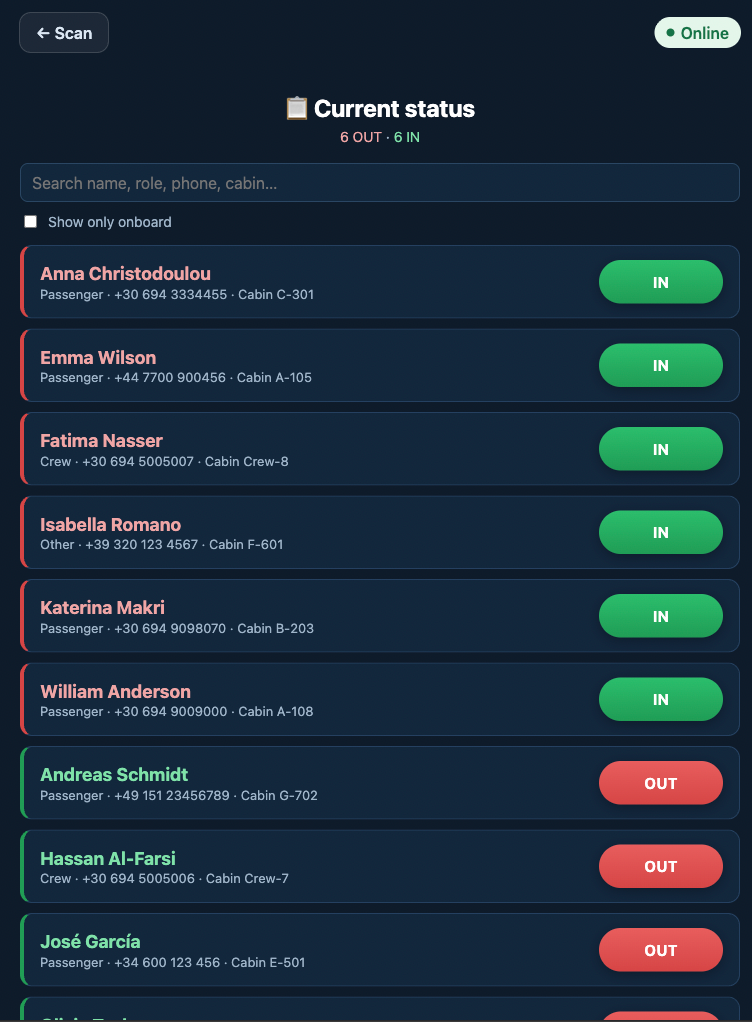
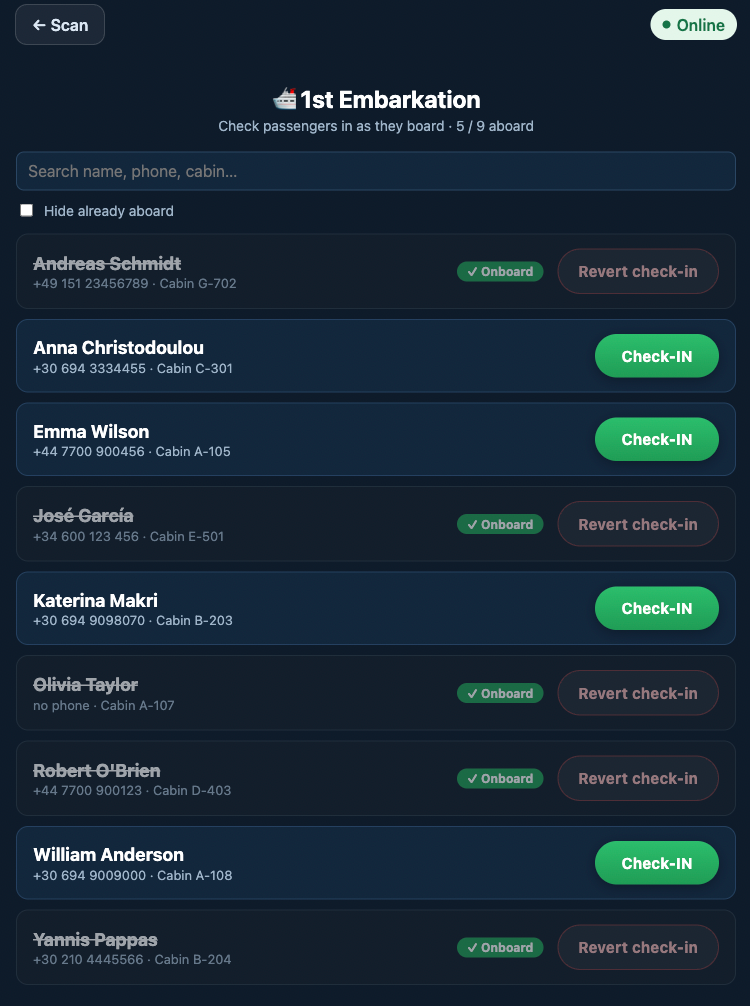
Self-scan mode
Calm enough to face the passengers.
Leave the tablet at the gangway and let guests scan themselves. The live status and first check-in information menus sit behind a 4-digit crew PIN, asked every single time they're opened.
Boarding day starts with a list, not a queue: bring the whole manifest aboard with one tap per name, personal details, or whatever works for you.
Straight answers
“What if…?”
The questions every captain and purser asks first — answered the way the system actually behaves.
W—01The internet drops in the middle of boarding.+
The tablet doesn't notice the drama. It validates each pass against its local copy of your people list, records every scan on the device, and uploads the queue by itself, within seconds of reconnection. Nothing lost, nothing counted twice.
W—02The signal returns. Who presses the sync button?+
No one — there is no sync button. Queued scans upload themselves within seconds of reconnection, and every scan carries a unique fingerprint, so a retry can never become a duplicate. Nothing to press, nothing to remember, nothing lost.
W—03Offline for hours — or days. Do we still know who's aboard?+
Yes — the tablet itself keeps the answer. Its status board reads from the local record, and every offline scan updates it on the spot. No signal for hours or days, and the crew still sees exactly who is on board right now, straight from the tablet.
W—04The tablet reboots after hours offline.+
Queued scans are saved on the device's storage, not in memory. Reboot it, refresh it, drop it in a drawer — the queue is still there, and it syncs the moment the tablet is back online.
W—05Someone scans IN twice, or forgets to scan OUT.+
The scan is recorded and an amber warning is raised — the line is never blocked. The office sees the same warning on the dashboard; a quick word clears it, and a manual correction repairs a genuinely missed movement.
W—06A person is deleted, and the ID number is later reused.+
Completely safe. Their history stays attached to a snapshot of who they were at the time. Old scans keep showing the old person; new scans belong to the new one. The record is never rewritten.
W—07An expired or deactivated pass shows up at the gangway.+
A clear red refusal, with the reason — even fully offline. And an expired pass can't be quietly switched back on: the system refuses until an administrator sets a new expiry date first. Deliberately.
W—08A passenger turns up without their pass.+
No card, no drama. The crew finds them by name on the tablet's PIN-protected list and taps them aboard — a few seconds, and the movement lands in the same record as any scan.
W—09Scans arrive out of order after a long offline spell.+
On-board status is always derived from the complete, time-ordered history — never from the order events happened to arrive. Late-syncing scans slot into their place and the count self-corrects.
Built for you
Commissioned like a vessel. Not downloaded like an app.
POBoard is delivered as an installation by ‘Koronias App Development’ — a senior software studio that designs and builds systems of every kind, end to end: web platforms, mobile apps, integrations, custom tooling, AI.
Your installation is engineered around your operation. Different fleet, different workflow, different systems already in place — we shape the product to fit, and keep shaping it as you grow.
You talk directly to the engineers who wrote the code — through delivery, training and every season after.
- ✓
Your brand on everything. Name, logo, colors, passes, tablet — your crew and guests see your company, not ours.
- ✓
Your codes, your cards. Code 128 out of the box — or we configure the scanner to read the coded cards your people already carry, QR included.
- ✓
Integrations, built to order. Booking platforms, ERP, HR, crewing or access-control systems — if it has an interface, we can connect POBoard to it.
- ✓
Migrations handled. Existing spreadsheets, passenger lists and historical records move in with you — we do the carrying. Day to day, a whole guest list imports from Excel in minutes.
- ✓
Custom features on request. If your operation needs something the product doesn't do yet, we build it — for you, into your instance.
- ✓
Delivered complete. Tablet supplied and configured, people list loaded, crew trained, full operator manual in hand.
- AGREEMENT
- BRANDING
- DATA ONBOARDING
- TABLET SETUP
- CREW TRAINING
- GO-LIVE
Beyond the gangway — the same platform adapts to any place that must know exactly who is inside right now.
- DAY CRUISES
- SMALL FERRIES
- CHARTERS & MINI-CRUISES
- SUPERYACHTS
- MARINAS
- REMOTE FACILITIES
- EVENTS
Book a demo
See your gangway running on it.
A 30-minute live demo on a real system with sample data. A discussion of your needs, the processes you're already using & the customizations for your company.
or request a written proposal — no meeting needed